
A photo of your dream,
revealed one day at a time.
A habit tracker and digital vision board. Pick a photo that captures your future goal, check in each day, and watch it come into focus, one piece at a time.



Save $10 a day for Sydney vacation
Day 0 of 7 · 0 revealed

0 / 7
Journey complete
Get Reveal the Dream
Reveal the Dream, the vision board habit tracker, is available free on:
Why I Created Reveal the Dream

Hi- I'm Lee. I built Reveal the Dream to help me with my own discipline and accountability. I'd write down my goals, set a reminder, think about the goal constantly, and yet I'd still let a day slide. So I'd get annoyed with myself, reset the goal back to day 1, then get discouraged and stop trying altogether.
Most goals are lost to striving for perfection.
That's why I built Reveal the Dream. I wanted to hold myself accountable without getting caught up in trying to be perfect. I can see the days I slipped and still keep working toward the ultimate goal. That's why nothing resets, everything earned stays, and the journey keeps going.
Getting started is easy. Choose your own photo from your library, pick how it uncovers, then put it on your home screen and your wrist so it's in front of you without opening anything. Staying accountable takes but a glance. You can check out some of the most common dreams other users track.
Reveal the Dream is a free download on iPhone, iPad, Mac, Apple Watch, Windows, Linux, Android and Wear OS. There's also a common questions section for a full breakdown of how the app works.
You can use the Message Me button with any questions and I'll get back to you within 24 hours. Reveal the Dream made me more disciplined and easier on myself at the same time. I look forward to hearing what you uncover.
Cheers -Lee
You can also check out my other apps The Long View, MyLinedChart, Still Dock, Keep the Diff, Copy Shelter, and Prompt Petal.
Some common journeys
Use these as an idea to get you started on your own dream. A few come up often enough to have a page of their own: counting sober days, saving for something specific, training around rest days and revising for an exam. Rather work on paper? The free printable 30 day challenge does the same thing with scissors.
-
Fitness
Get 10,000 steps a day
30 days -
Money
Save $10 a day for a summer trip
90 days -
Quitting
No cigarettes, not one
30 days -
Learning
Practice a new language for 20 minutes
45 days -
Reading
Read 10 pages before bed
30 days -
Health
No alcohol
30 days -
Mind
Meditate for 10 minutes each morning
21 days -
Creative
Write 500 words a day
60 days -
Running
Train for a 10K
8 weeks -
Music
Practice an instrument for 15 minutes
30 days
Earned Still to come Missed
Nothing resets. Your streak doesn't break.
Most goals are lost to striving for perfection, so there is no streak to break and nothing to reset. The only thing being tracked is whether you came back and kept going.
Let's say you're on day four of a seven day journey, and day three got away from you. Mark it missed and that day's piece stays covered. Day four carries on as normal, and every day you already earned stays uncovered. And if you need to change a check in, Day Review lets you go back and update a day.
Five people, five photos
Every journey starts with a photo you choose from your own library. Different goal, different picture, different length, different way of revealing.
-
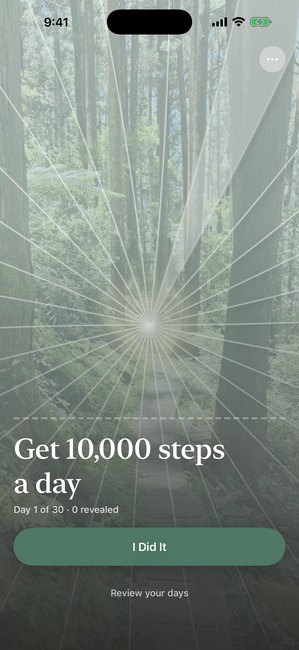
Get 10,000 steps a day
Day 1 of 30, nothing revealed yet
-
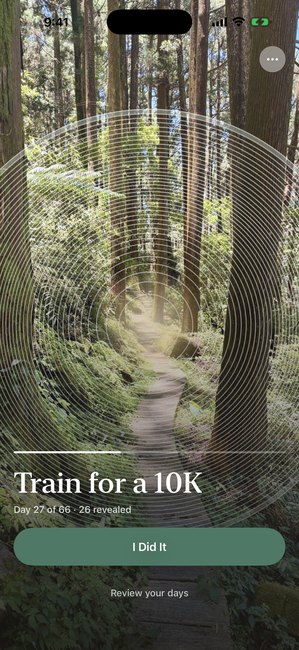
Train for a 10K
Day 27 of 66, revealing with Rings
-
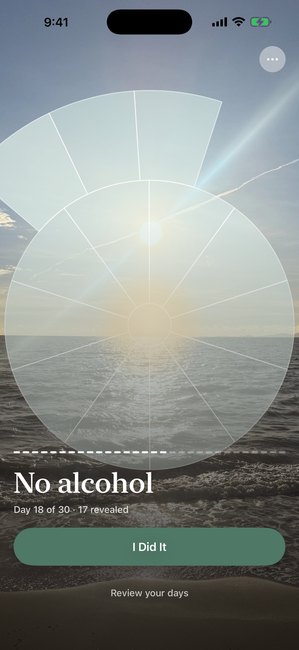
No alcohol
Day 18 of 30, revealing with Arcs
-
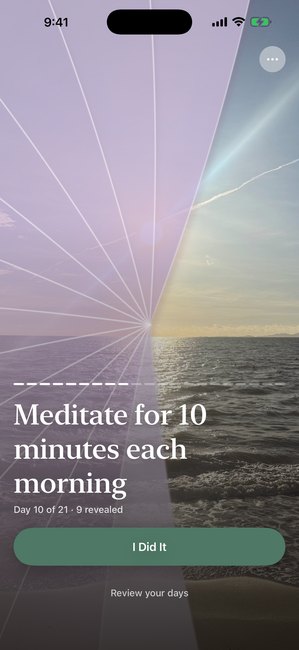
Meditate for 10 minutes each morning
Day 10 of 21, purple cover
-
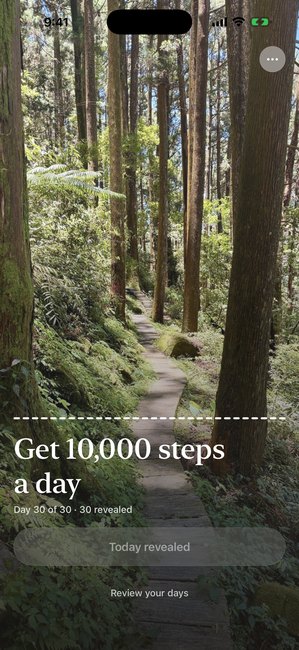
Get 10,000 steps a day
Day 30 of 30, the whole photo reveals


Your habit tracker, where you already look: watches and widgets
Reveal the Dream is also on your watch, phone screen and even on your computer. Here is how the vision board widget works on each one.


The app screen and the widget both tell you when your next check-in opens. The line names the time you picked and counts down to it, so nine tonight reads as nine tonight and nobody is adding twenty-two hours in their head. Checking in is still the only thing that uncovers your photo. The watch shows the day you are on and leaves the clock to the phone. If you would sooner not have one at all, a single switch in Settings takes the countdown off every screen. On iPhone it can also sit on the Lock Screen and in the Dynamic Island as a Live Activity, and on Android as a silent notification. Both of those stay off until you turn them on. There is a guide to putting a vision board on your lock screen.
Free vs Premium
Start free. Premium adds more journeys, more control, and more ways to reveal. One yearly plan starts with 7 days free, and another costs less up front.
Try it
Cover strength, cover color and reveal style are all yours to move. Change them and the real reveal changes straight away, so you can see exactly how your own photo will look.
At 40% a little of the photo shows through from day one, so you can tell there is something under there. At 100% it is hidden completely. Revealed pieces are always fully visible, at every setting.
Free
- One journey at a time
- 7-day or 30-day lengths
- The Petals reveal style
- The home screen widget
- Apple Watch and Wear OS
- A countdown to your next check-in
- Export a finished reveal
- Adjustable text size
- Your choice of text color over the photo
- Snooze the check-in reminder: 15 minutes, 1 hour, or tomorrow
- Show the date a journey started, in the app and on your widget
- Report a bug or request a feature, with up to three screenshots
- What's New in Settings, after every update
- Twenty-one languages, set by your device or picked in Settings
- Backed up through your own iCloud or Google account, on Apple and Android
Premium Purchase here for the lowest price.
- Everything in Free, plus
- Your journeys synced between Apple, Android, Windows and Linux, and the only backup Windows and Linux have
- Several journeys at once
- Custom journey lengths, or pick the end date
- Day by day journeys, with no end date: a new round every 365 days, slips counted and milestones marked
- Rest days, so five days a week is not two missed days
- Repeating journeys, so the next round starts on its own
- App Lock, so only you can open it
- Seven cover colors
- Rings and Arcs reveal styles
- Today's cover softens as the day goes on
- Your finished photos as a gallery
- Per-journey results
- Or Premium Lifetime: pay once, nothing renews
Get Reveal the Dream
Free on Apple, Android, Windows, and Linux. Sign up here for the best pricing on Premium.
| Plan | Feature | iPhone | iPad | Mac | Apple Watch | Windows | Linux | Android | Wear OS |
|---|---|---|---|---|---|---|---|---|---|
| Free | Daily check-in | Included | Included | Included | Included | Included | Included | Included | Included |
| One journey at a time | Included | Included | Included | Included | Included | Included | Included | Included | |
| 7 or 30 day lengths | Included | Included | Included | Included | Included | Included | Included | Included | |
| The Petals reveal style | Included | Included | Included | Included | Included | Included | Included | Included | |
| Widget | Included | Included | Included | Not available | Included | Not available | Included | Not available | |
| Watch complication | Not available | Not available | Not available | Included | Not available | Not available | Not available | Included | |
| Watch tile | Not available | Not available | Not available | Not available | Not available | Not available | Not available | Included | |
| Always-on-top mini window | Not available | Not available | Not available | Not available | Included | Included | Not available | Not available | |
| Export a finished reveal | Included | Included | Included | Not included | Included | Included | Included | Not included | |
| Backed up through your own iCloud or Google accountApple and Android only. Windows and Linux have neither, so Premium sync is their backup. | Included | Included | Included | Included | Not included | Not included | Included | Included | |
| Premium everything in Free, plus | Your journeys synced between Apple, Android, Windows and LinuxFree already syncs Apple devices through iCloud and Android devices through Google. The watches follow your active journey | Included | Included | Included | Included | Included | Included | Included | Included |
| Several journeys at once | Included | Included | Included | Included | Included | Included | Included | Included | |
| A widget for each journeyPin one per journey on your home screen | Included | Included | Included | Not available | Included | Not available | Included | Not available | |
| Custom journey lengths, or pick the end date | Included | Included | Included | Included | Included | Included | Included | Included | |
| Day by day journeys, with no end date | Included | Included | Included | Included | Included | Included | Included | Included | |
| Rest daysPick the weekdays you check in on | Included | Included | Included | Included | Included | Included | Included | Included | |
| Repeating journeysThe next round starts on its own | Included | Included | Included | Included | Included | Included | Included | Included | |
| Seven cover colors | Included | Included | Included | Included | Included | Included | Included | Included | |
| Rings and Arcs styles | Included | Included | Included | Included | Included | Included | Included | Included | |
| Finished photos as a gallery | Included | Included | Included | Not included | Included | Included | Included | Not included | |
| Per-journey results | Included | Included | Included | Not included | Included | Included | Included | Not included | |
| App LockFace ID, your fingerprint or a password. On the watches, App Lock hides your journey. | Included | Included | Included | Not available | Included | Included | Included | Not available |
Frequently asked questions
Common questions about goal setting, habit tracking, and how the reveal works. For anything else, visit Support, read our Privacy Policy, or check the Press page.
What is Reveal the Dream?
Reveal the Dream is an app for iPhone, iPad, Mac, Apple Watch, Windows, Linux, Android and Wear OS, built around one idea: pick a photo of a goal you're working toward, and it starts covered by a frosted layer. The cover is divided into one region per day of a journey you choose, 7 days, 30 days, or a custom length. Each daily check-in uncovers one more region, in the app and on your home screen widget, until the whole photo is revealed.
Is this a vision board app?
It works like a vision board in that a photo of something you want stays where you'll actually see it, and this one responds to what you do. Every check-in reveals a little more of the picture, so the vision board updates itself as you make progress. If you are still choosing, here is how the free vision board apps compare, and what to put on a vision board in the first place.
Do I use my own photo?
Yes, always. You pick any photo from your own library, whichever one means you got there: the place you are saving for, the trail you want to finish, someone you are doing it for. Nothing is chosen for you and there is no set to pick from. The three on this page are only here so you can try the reveal without installing anything. Your photo stays on your device.
Is this a goal setting app?
Yes. You set a goal, choose how long you are giving yourself, and check in once a day until you get there. What makes it different from most goal setting apps is what you get back for showing up: a photo of the goal itself uncovers a little more each day, until the picture is whole and so is the habit.
Is it a habit tracker?
Yes, in the sense that a daily check-in is exactly what a habit tracker asks for. The difference is what you see for doing it: this habit tracker shows a little more of a photo you chose. Miss a day and nothing resets, so it doubles as a simple goal tracker for the goal itself.
What happens if I miss a day?
Nothing resets. You can mark the day as missed, and that day's piece stays covered, a little heavier than the days still ahead of it, while every piece you have already earned stays exactly where it is. Say you are four days into a seven day journey and day three got away from you. Day three stays covered, day four carries on as normal, and three days are still to come. Missed days stay visible on purpose. They are a record of what happened. There is no streak to break and nothing to start over.
Does it work on Android, Apple Watch and Mac?
Yes. Reveal the Dream is a native app for iPhone, iPad, Mac, Apple Watch, Windows, Linux, Android and Wear OS. Mac, Windows and Linux download direct from this site, and it is on the App Store, the Microsoft Store and Google Play. Your Apple devices stay in step through your own iCloud account, and your Android phone and Wear OS watch through your own Google account. Premium adds sync between Apple, Android, Windows and Linux. The home screen widget and the watch both show the reveal without opening the app.
Does it work on a Chromebook?
Yes. Get it from Google Play on your Chromebook. It is the same Android app, in a window you can resize, and it works with your keyboard, mouse or trackpad. ChromeOS has no home screen widgets, so on a Chromebook the reveal lives in the app.
What languages is it in?
Twenty-one: English, German, Spanish for Spain and Mexico, French, Italian, Japanese, Korean, Brazilian Portuguese, Simplified Chinese, Hindi, Hebrew, Thai, Vietnamese, Arabic, Indonesian, Dutch, Polish, Swedish, Turkish and Traditional Chinese. The app follows your device's language, and you can pick another in Settings. It is the same on iPhone, iPad, Mac, Apple Watch, Android, Wear OS and Windows.
Is my photo private? Where is it stored?
Your photo stays on your device. The app has no analytics and no tracking of any kind, and no account unless you choose to sign in with an email address to use a subscription you bought on another platform. This website is a separate thing from the app and does use analytics, which the Privacy Policy explains. Backups go through your own iCloud or Google account. Premium can also keep your journeys in step across Apple, Android and Windows; that copy is encrypted on your device before it leaves and we cannot read it, which also means that if you lose your recovery code and your devices, nobody can open it, including us. Deleting the app removes everything from your device. If you turned on cross-platform sync, the single encrypted copy we hold is deleted when you turn sync off, or at once with the Delete Account button in the app. If you would rather nobody who picks up your device could see it, Premium's App Lock keeps the app behind Face ID, your fingerprint or a password, and can hide the widget and reminders too. See our Privacy Policy for details.
Can I lock the app so nobody else can open it?
Yes, with Premium. App Lock keeps the app behind Face ID or Touch ID on Apple devices, your fingerprint on Android, and a password you set on Windows and Linux, falling back to your device passcode so a failed fingerprint never locks you out of your own goal. When you switch it on you choose, once, whether to hide the widget and reminders as well, since a widget on your home screen shows the goal without unlocking anything. Opening the photo picker does not count as leaving the app. If your subscription ends, the lock stays on. Premium is only needed to switch it on.
Will you put your logo on my photo?
No, unless you ask us to. Most apps stamp their logo on your photo and charge you to remove it. Ours is off unless you turn it on, and exporting a finished reveal is free for everyone.
Do I need an account?
No. You open the app, pick a photo, and start a journey, and nothing in the app asks you for an address. There is one optional sign-in, and only one reason for it: if you bought Premium on one platform and want it on another, you can sign in with Apple, Google or Microsoft, a QR code from your phone, or a six digit code we email you. It carries your subscription across and nothing else. Your journeys and photos never travel with it.
Is it free? What does Premium add?
Reveal the Dream is free to use. The free version includes one journey at a time, 7-day or 30-day lengths, the Petals reveal style, the home screen widget, Apple Watch and Wear OS, a countdown to the next check-in, your choice of text color over the photo, snoozing the check-in reminder, the date a journey started, reporting a bug or requesting a feature, What's New after each update, twenty-one languages, and exporting a finished reveal. An optional Premium subscription adds sync between Apple, Android, Windows and Linux, several journeys at once, custom journey lengths, a day by day journey with no end, or an end date you pick, rest days so you can pick which weekdays you check in on, repeating journeys that start their next round on their own, App Lock, seven cover colors, two more reveal styles (Rings and Arcs), your finished photos as a gallery with per-journey results, a cover that softens as the day goes on, and the ability to keep any cover strength, color or style you've chosen.
How long can a journey be?
Free journeys are 7 or 30 days. Premium adds a custom length, so a journey can match whatever timeline your goal actually needs.
Can I run more than one journey at once?
With the free version, one journey at a time. Premium lets you run several journeys together, for example a fitness goal and a savings goal side by side.
What is the home screen widget?
It's the reveal, living on your home screen. Add it once, and every completed check-in shows up there too, no need to open the app to see today's progress.